Entering Default Board Sizes
- First Run of MBP on Model
When a board type, material and thickness, is encountered for the first time MBP will fill in the board size with a value matching the largest component of that board type. You should enter a size, width and length, matching the orientation and dimensions you expect to be using when manufacturing. The width value is the vertical Y direction and the length value is the horizontal X direction. The entered values will be remembered for this model and will be filled in by MBP whenever a board of this type is encountered when running MBP on other models for the first time.
- Validation of Board Size
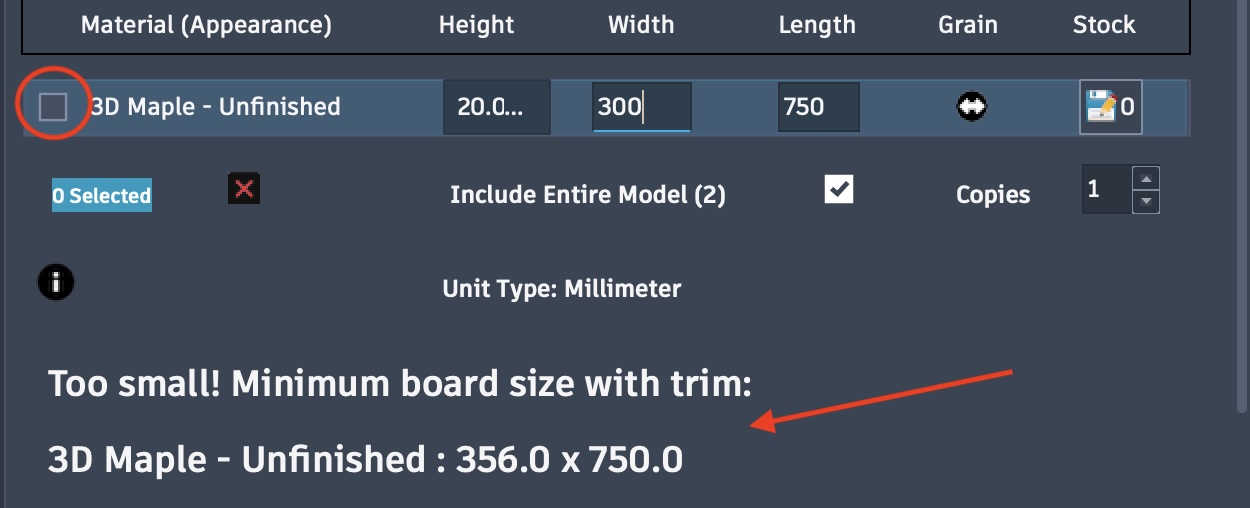
If you enter values smaller than the largest component of that board type MBP will present a warning message indicating the board size is too small and it will display the minimum board size required with the trim (Trim on Board Edge option) value included. This size takes into account the board grain direction selected. When this warning is displayed, selecting the checkbox will fill in this value if you choose to use this minimum board size. Otherwise enter a larger size to match the board you plan to use. See image below showing a width value that is too small for the selected board grain direction. The minimum board size required is displayed in the warning message.
Click on the Grain icon
 to toggle the grain direction. Toggling the grain direction
will change the minimum board size required matching component lengths with width when vertical
to toggle the grain direction. Toggling the grain direction
will change the minimum board size required matching component lengths with width when vertical
 and length when horizontal . You can choose to continue with the smaller board
size or change the board size to match a larger board size you plan to use.
and length when horizontal . You can choose to continue with the smaller board
size or change the board size to match a larger board size you plan to use.