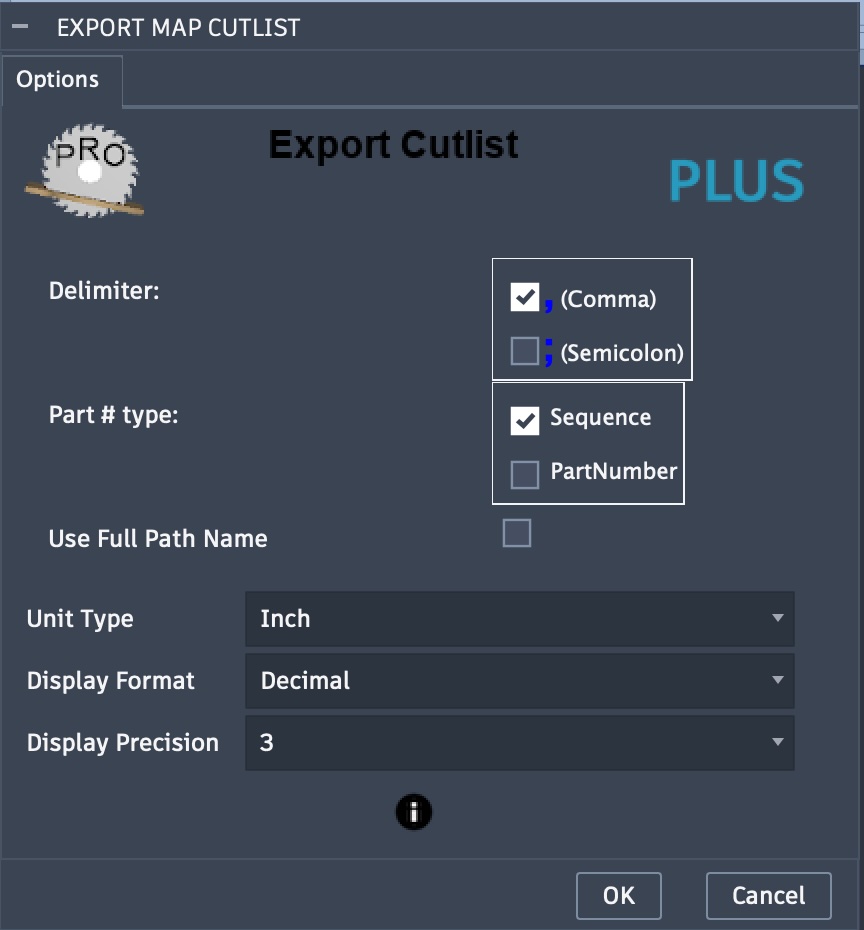
Export map Cutlist
The Export Cutlist task will create a cutlist of the components in a created map. The cutlist will be a CSV file which can be viewed, modified, or imported into applications which handle the common format.
Note: Recent changes in Fusion will automatically assign a PartNumber property to each component. This number is basically a 23-character date-timestamp. You can optionally include this part number or a sequential part number unique to the board as described below with the Include Part # option.
Labeling Options:
Delimiter: Comma or Semicolon to separate values in the CSV file.
- Part # type: the part numbering type to use
Sequential number parts on a board
PartNumber to include the PartNumber property of the component
Use Full Path Name: When selected, the full path is used to describe components.
Unit Type: Set the unit type for dimensions, such as centimeters or inches.
Display Format: Available when unit type is set to inches. Options include fractional or decimal display.
Display Precision: A selection of 0-3 when decimal or 1/16 to 1/64 when fractional.