Export map to SVG
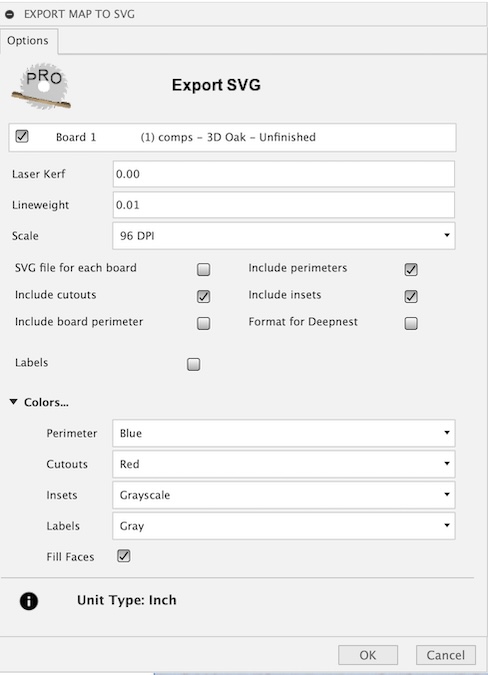
This task will export a flat panel design from the created map as a multicolored SVG file. The colors represent loops taken from the top view of each component in the map. The colored loops include Perimeter, Insets, or Cutouts. The Insets layer includes features such as pockets, rebates, dados, and holes. These profiles will be included as solid lines in the color specified in the color options.
A separate profile selection Edge Treatments, when selected, will include both edge treatments (Chamfering and Fillet) and variable depth pockets. These profile features will be included as continuous lines in the color specified in the color options.
The Bottom Insets option, when selected, will include the bottom insets as dashed lines in the color specified in the color options.
You can also include component labels with part numbers, a descriptive name, and dimensions. Insets has a Grayscale color which when set will produce a varying gray fill color, using the lighter gray for deeper inset pockets and the darker gray for shallow inset pockets. This enables you to create an infinite number of tool paths based on depth.
The SVG output file will be scaled to selected Dots Per Inch (DPI). Be sure to select the appropriate scale based on the application you plan to import it into.
Scale to 96 DPI, the modern scale used by Inkscape and browsers.
Scale to 72 DPI, an older scale used by Adobe Illustrator.
Scale to 90 DPI, a retired scale used by Vectric VCarve Pro.